

Accept online payments for invoices with a payment link
Write the invoice, send the payment link, done: your customer pays by card in one click — the money goes straight to you through your own Stripe account, and Rechno marks the invoice as paid automatically.
Free plan without a credit card · 15-day money-back guarantee from your first purchase
In short
What is a payment link?
A payment link leads to a payment page for exactly one invoice. Your customer clicks it, sees the invoice and pays it online by card — without typing in an IBAN and payment reference. For you, that means you accept online payments without your own online shop and without matching payments by hand.
The payment is processed by Stripe, a payment service provider for card and online payments. Paying by card is part of everyday life in Austria: according to Stripe (opens in a new tab), people in Austria made more card payments in 2024 than ever before.
Online payment via Stripe is available in every plan, including the free one — learn more under plans and pricing.
How it works
How to create a payment link in Rechno
Set it up once, then use it for every invoice.
- 1
Connect your Stripe account
Under Settings › Payments, enter the publishable key and the secret key of your Stripe account and switch on online payments. The keys are stored encrypted.
- 2
Send the payment link
For a published, open invoice, send the payment link by email from Rechno (in every plan, including the free one) — the [zahlungslink] placeholder inserts it into the template. Or simply copy the link.
- 3
Marked as paid automatically
Your customer pays by card. Rechno records the payment, sets the invoice to “Paid” and sends your customer a payment confirmation with the invoice as a PDF.
Stripe explained simply
Never worked with Stripe? Here is what you need to know
Stripe processes the card payment and pays the money out to you. Rechno connects your invoices to your own Stripe account — that’s all it takes.
- Open an account: you sign up with Stripe and add the bank account for payouts (opens in a new tab) there (in Austria with an IBAN). Stripe charges no setup or monthly fees (opens in a new tab).
- Costs: Stripe charges a fee per payment — for standard cards from the EEA, 1,5 % + 0,25 € according to Stripe’s pricing (opens in a new tab). An invoice for 200 € therefore costs 3,00 € + 0,25 € = 3,25 €. Rechno charges no additional transaction fee.
- Payout: according to Stripe, the first payout usually arrives within 7 to 14 days. After that, Stripe pays out automatically to your bank account (opens in a new tab) — daily, weekly or monthly, depending on your settings.
- Security: your customer enters the card details in Stripe’s payment form, not in Rechno. Stripe is certified as a PCI Service Provider Level 1 (opens in a new tab), the most stringent level in the payments industry.
Fees, payout times and legal questions in detail: guide Get invoices paid online.
Free plan without a credit card · 15-day money-back guarantee from your first purchase
For Stripe users
Your own Stripe account — no platform in between
Already know Stripe? Then just add your own API keys. Rechno creates the payment directly in your Stripe account and takes care of the rest automatically.
- Publishable key and secret key from the Stripe Dashboard (Developers › API keys) — stored encrypted, changeable by administrators only
- Payments go directly to your Stripe account — Rechno holds no money and is not involved in your payments
- After payment: payment recorded, invoice set to “Paid”, confirmation with PDF to your customer — you decide the subject and text of the email
- The link always charges the amount currently open — after a partial payment, only the rest
- Payment page in your colors and in 15 languages
- Deactivate a payment link at any time — after that, it can no longer be used to pay
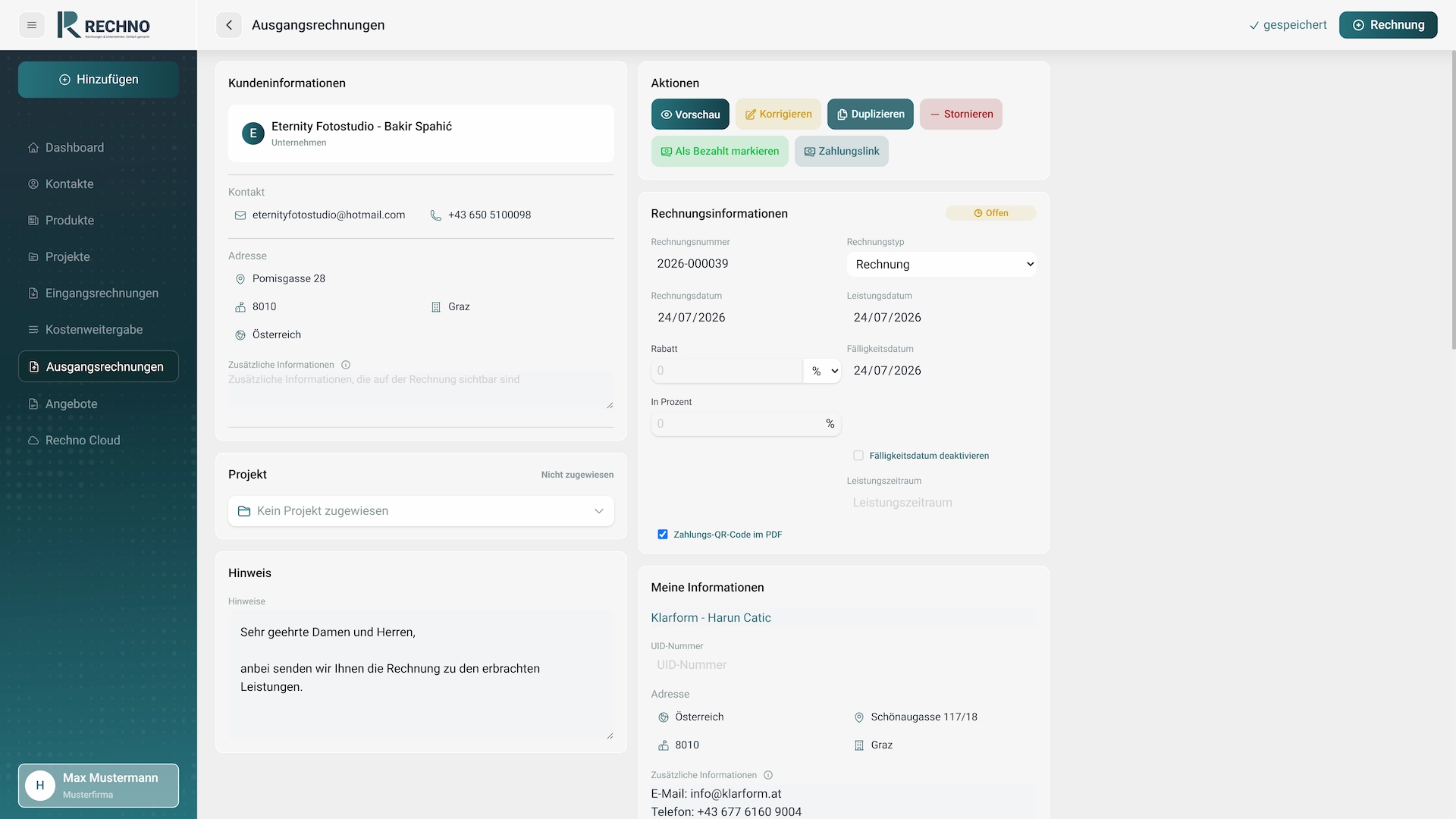
Send the invoice, click the link, paid
Connect Stripe and accept online payments directly from Rechno — choose your plan.
Good to know
What the payment link can — and cannot — do
- Customers pay by card. Payment methods that redirect to the bank, such as EPS or Klarna, are not available on the Rechno payment page; which other methods are shown depends on the settings of your Stripe account.
- Payment links are available for published, open invoices — not for quotes, cancellations or credit notes.
- Payments are made in euros.
- The link is sent by email or copied and does not appear on the PDF. For customers who prefer a bank transfer, the PDF carries the payment QR code once your bank details are saved.
Selling through a WordPress shop? With the WooCommerce integration, every order automatically becomes an invoice.
Legal & cash register
Payment link, invoice and cash register
The payment link does not replace the invoice: it still has to contain all mandatory details under § 11 UStG (opens in a new tab) (Austrian VAT Act) — the link is just the convenient way to pay it. On the payment page, your customer sees the invoice as a PDF.
Rechno is invoicing software and not a cash register (Registrierkasse). Payment links are meant for paying remotely. If someone pays via the link in your presence, for example on site via QR code, it counts as a cash sale and belongs in your cash register. When the cash register obligation applies is explained by the Austrian Business Service Portal (USP) (opens in a new tab).
All mandatory details in detail: guide How to write an invoice in Austria.
Official information for further reading
For reference: pricing, payouts and security straight from Stripe, plus the law and the Business Service Portal on invoices and cash registers — so you can check everything yourself.
- Stripe: Preise und Gebühren (Österreich) (opens in a new tab) (accessed on 15.10.2026)
- Stripe Docs: Auszahlungen (opens in a new tab) (accessed on 15.10.2026)
- Stripe Docs: Sicherheit bei Stripe (u. a. PCI Service Provider Level 1) (opens in a new tab) (accessed on 04.11.2026)
- Stripe: Payments in Austria: An in-depth guide (opens in a new tab) (accessed on 04.11.2026)
- RIS – Rechtsinformationssystem des Bundes: Umsatzsteuergesetz 1994, § 11 (Ausstellung von Rechnungen) (opens in a new tab) (accessed on 15.10.2026)
- Unternehmensserviceportal (USP): Registrierkassenpflicht (opens in a new tab) (accessed on 04.11.2026)
Most of these sources are in German.
Transparent pricing with no hidden costs
From 10 € per month — cancel at any time, 15-day money-back guarantee from your first purchase.