

Digitize incoming invoices – no more piles of paper
Supplier invoices, fuel receipts, material purchases: with Rechno, you store all incoming invoices digitally in one place — photographed or uploaded, easy to find at any time.
Free plan without a credit card · 15-day money-back guarantee from your first purchase
The problem
Why incoming invoices belong in digital form
Every business receives invoices all the time: from suppliers, from the repair shop, from wholesalers. On paper or scattered across your email inbox, these receipts get lost — and at the end of the quarter, the search for the bookkeeping begins.
With incoming invoice software like Rechno, every receipt lands right where it belongs: digital, searchable and with the status paid or open. This way, you always see which invoices still need to be paid — and at the end, your tax advisor gets everything together instead of piece by piece.
More than a filing cabinet
What Rechno records for every incoming invoice
An incoming invoice in Rechno is more than a filed PDF. For every receipt, you store the data you need for payment and bookkeeping:
- Supplier, invoice number and invoice date — so every receipt can be clearly assigned
- Net, VAT and gross — if the amounts don’t add up, Rechno points it out
- Due date and early payment discount (Skonto) — so you don’t miss a payment deadline or a discount
- Payments — including partial payments, with the remaining open amount
- Files and notes — the receipt itself and everything that goes with it
Why this matters: you can only deduct the input VAT on an incoming invoice if you have a proper invoice — that’s how the Business Service Portal (USP) (opens in a new tab) explains it. Which details belong on it is set out in § 11 UStG (opens in a new tab). If you record your receipts carefully as soon as they arrive, you notice early when something is missing — and can ask the supplier while the matter is still fresh.
How it works
Store an incoming invoice in three steps
- 1
Photograph or upload
Photograph the receipt with your phone or upload the PDF invoice — right in the browser, no extra app needed.
- 2
Enter the data
Enter the amount, date and supplier — or let AI receipt capture read them automatically.
- 3
Done & easy to find
The receipt is archived digitally, searchable and automatically included in the next export for your tax advisor.
Always in view
Open incoming invoices at a glance
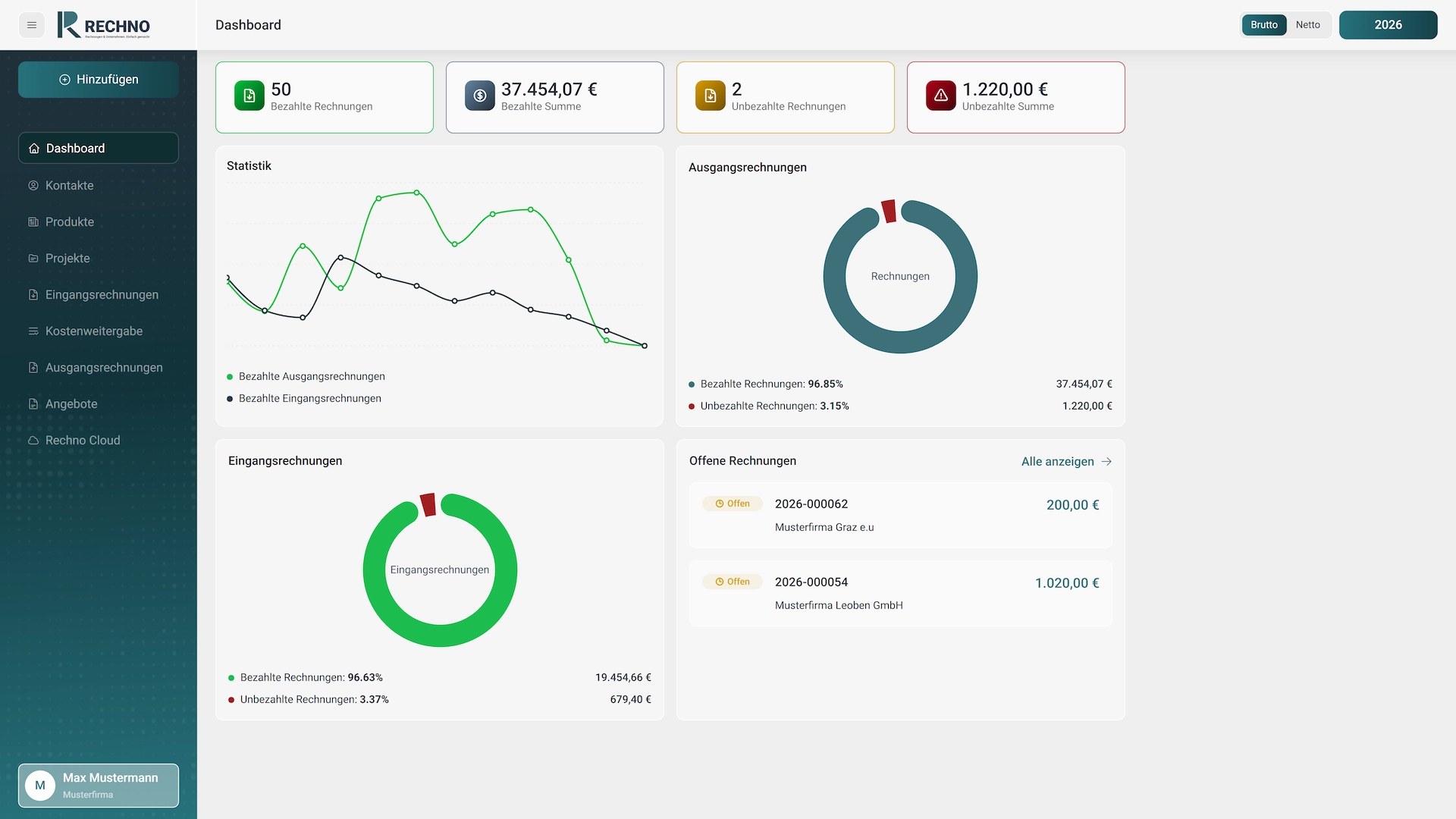
The dashboard shows you paid and unpaid incoming invoices including totals — so you never miss a payment deadline and keep your expenses under control.
- Paid / open status for every receipt
- Totals and statistics per year
- 5 incoming invoices per month, even in the free plan
- Unlimited* incoming invoices in the “Eingang + Ausgang” plan
* “Unlimited” applies within fair use, as is usual for a business (terms and conditions, point 5):
- Invoices, quotes and incoming invoices: up to 100.000 documents per month in total
- Contacts: up to 10.000.000
- Products: up to 10.000.000
Transparent pricing with no hidden costs
From 10 € per month — cancel at any time, 15-day money-back guarantee from your first purchase.
From everyday practice
What this looks like day to day
A plumbing business buys material from the wholesaler on Monday, fills up the van on Tuesday and receives the repair shop’s invoice by email on Wednesday. Instead of spreading the receipts across the glove compartment, the inbox and the filing tray, all three end up in Rechno the same day: the fuel receipt as a phone photo, the two invoices as PDFs.
At the end of the month, you see at a glance which invoices are still open and when they are due. And when your tax advisor needs the receipts, you export them all together — more on this under Working with your tax advisor.
It’s even faster with AI receipt capture: it reads the most important data from the receipt, and all you do is check the result — included in every plan, including the free one.
Free plan without a credit card · 15-day money-back guarantee from your first purchase
Good to know
Keeping receipts – the right way
In Austria, books and receipts are generally subject to a retention obligation of seven years (§ 132 BAO (opens in a new tab)). Digitally stored incoming invoices have a big advantage here: they don’t fade, don’t get lost and can be found in seconds.
The period starts at the end of the calendar year to which the receipt relates. An example: you keep an incoming invoice dated 3 March 2026 until 31 December 2033. Longer periods apply to some documents, for example those relating to real estate — the Business Service Portal (USP) (opens in a new tab) gives an overview.
Digital storage is allowed: receipts may be kept on data carriers if their complete, orderly, identical and true-to-original reproduction is guaranteed at all times until the end of the period (§ 132 Abs 2 BAO (opens in a new tab)). In addition, receipts should be kept in such an order that the entries can be checked at any time (§ 131 BAO (opens in a new tab)). The Austrian Economic Chamber (WKO) (opens in a new tab) points out that simply scanning them and saving them on a USB stick is not enough.
Rechno helps you keep your incoming invoices complete and organized in one place — with the file, the data and the payment status. How you meet your retention obligation in your specific case, and whether you may dispose of paper originals after digitizing them, is best clarified with your tax advisor.
Tip: what an invoice in Austria has to look like in the first place is explained in our guide How to write an invoice in Austria.
Official information for further reading
Retention periods and input VAT deduction — read them directly in the law, on the Business Service Portal and at the Austrian Economic Chamber.
- Unternehmensserviceportal (USP): Aufbewahrungspflicht (opens in a new tab) (accessed on 04.11.2026)
- Wirtschaftskammer Österreich (WKO): Aufbewahrungspflichten für Unternehmen (opens in a new tab) (accessed on 04.11.2026)
- RIS – Rechtsinformationssystem des Bundes: Bundesabgabenordnung, § 131 (Führung von Büchern und Aufzeichnungen, Datenträger) (opens in a new tab) (accessed on 04.11.2026)
- RIS – Rechtsinformationssystem des Bundes: Bundesabgabenordnung, § 132 (Aufbewahrungspflicht) (opens in a new tab) (accessed on 15.10.2026)
- Unternehmensserviceportal (USP): Vorsteuerabzug (opens in a new tab) (accessed on 04.11.2026)
- RIS – Rechtsinformationssystem des Bundes: Umsatzsteuergesetz 1994, § 11 (Ausstellung von Rechnungen) (opens in a new tab) (accessed on 15.10.2026)
Most of these sources are in German.
Ready to get rid of the paper pile?
Choose the plan that fits the number of receipts you have — and get started today.