
Create invoices online – neatly numbered, ready as a PDF
Choose the customer, add line items, publish: Rechno calculates totals and VAT, assigns the consecutive invoice number and creates the PDF with your logo.
Free plan without a credit card · 15-day money-back guarantee from your first purchase
Overview
How to create invoices with Rechno
Every invoice in Rechno starts as a draft. You pick the customer from your contacts, add products and services with their saved price or type in line items freely. Rechno calculates net amounts, discounts, the VAT for each tax rate and the total — and saves every entry automatically.
Only when you publish it does the invoice get its consecutive number and the invoice date. After that, it is locked: an issued invoice is never overwritten — if needed, it is corrected in a traceable way (more on that below).
You set the format of the invoice number once in the settings: prefix, suffix and number of digits, with placeholders such as the year if you like. If the year is part of the number, every new year starts again at 1. Switching from another program? Enter your first invoice number in Rechno — Rechno simply keeps counting from there.
You can write invoices in every plan, including the free one. How many invoices per month a plan includes is shown in the pricing overview.
How it works
Your finished invoice in three steps
- 1
Create a draft
Choose the customer and add line items from your products or type them in freely — Rechno calculates totals and VAT.
- 2
Check and publish
You check the preview and publish. The invoice gets its consecutive number and date and is locked from then on.
- 3
Send it and get paid
Download, print or email the PDF — optionally with a payment QR code that your customer scans with their banking app.
Write your next invoice with Rechno
5 invoices per month for free — no credit card, no risk.
Invoice editor
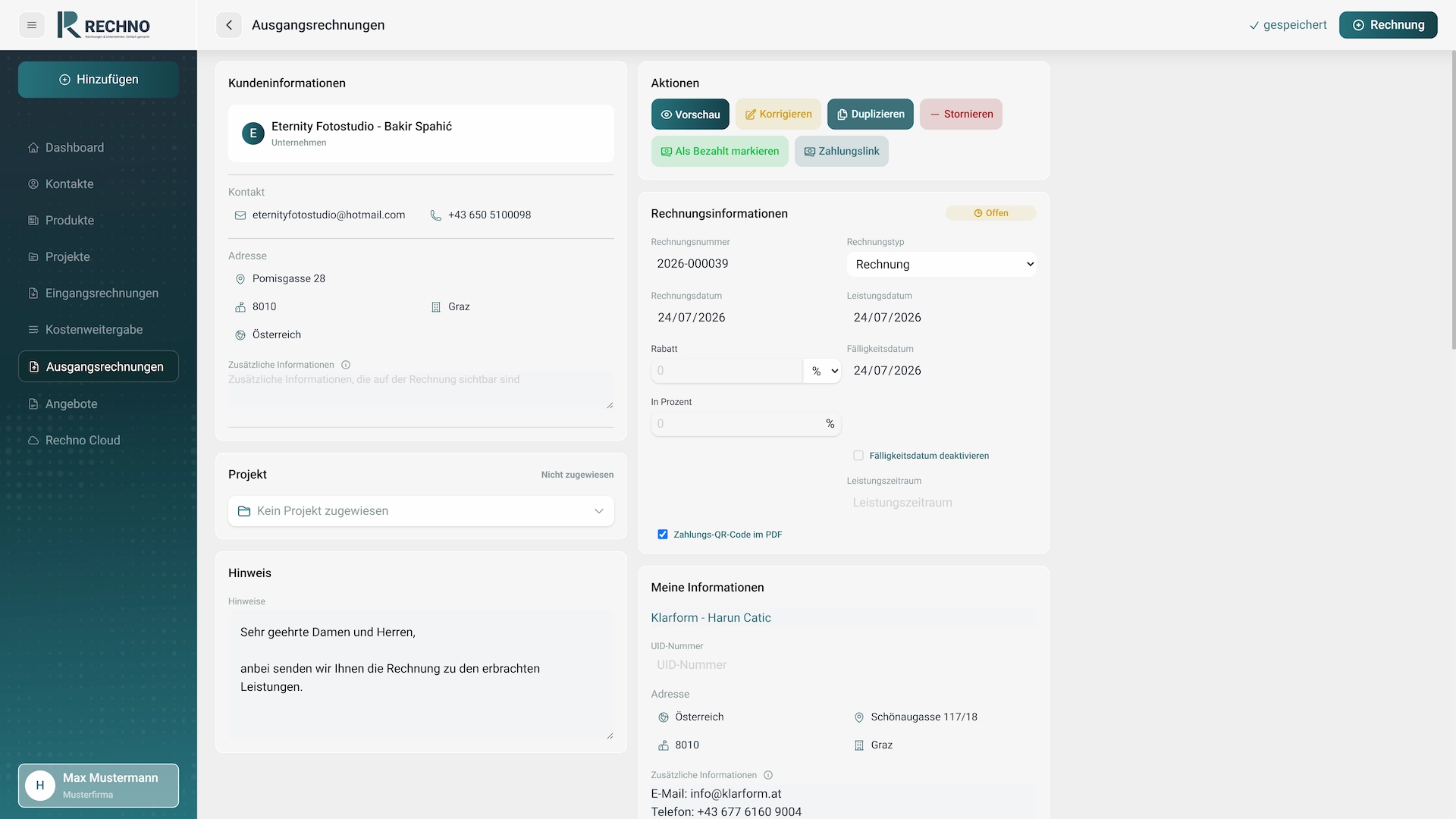
Every detail of your invoice at a glance
Customer details, your company details, number, date and line items sit side by side in the editor. Anything you have saved once, you don’t have to type again.
- Take customers from your contacts — with address and VAT ID
- Service date or service period and due date right in the invoice
- Discount per line item or on the entire invoice
- A notice in the draft when important information is missing — such as the customer’s address or your VAT ID
The finished PDF
Invoices that look like your business
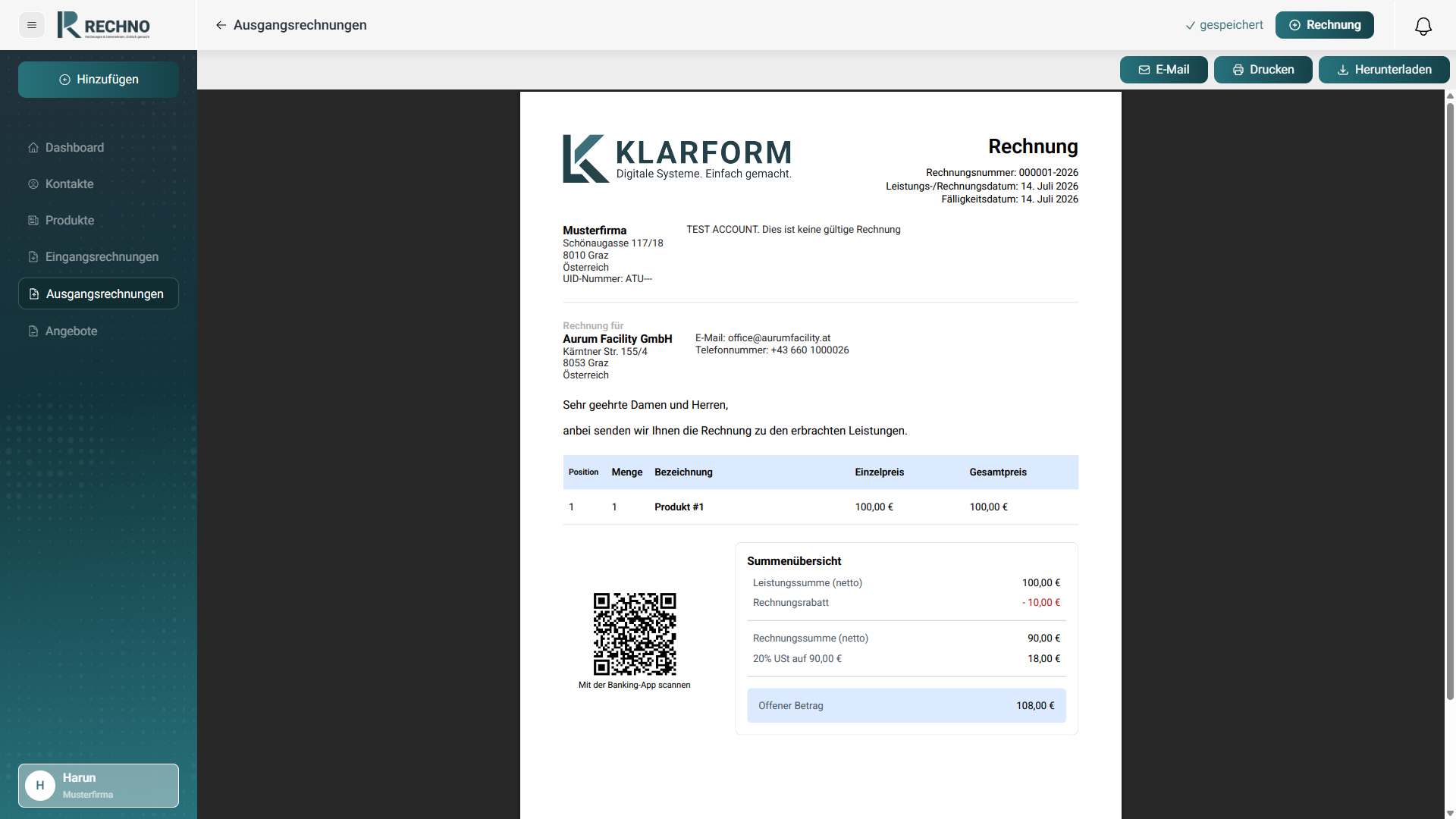
Every invoice becomes a clean PDF with your logo, a clear summary of totals and, if you like, a payment QR code. What else Rechno does for your outgoing invoices:
- Turn quotes into invoices in a few steps — in every plan, including the free one
- Small businesses: invoices without VAT, the exemption note is added automatically — in every plan, including the free one
- Send invoices by email directly from Rechno — via your own mailbox — in every plan, including the free one
- Payment QR code right on the PDF — customers pay with their banking app — in every plan, including the free one
- Your own logo, colors and invoice texts — in every plan, including the free one
In detail
Features that save time when invoicing
Around the invoice itself, Rechno comes with tools that make a difference every day:
- Early payment discounts (Skonto) in several tiers: for example 3 % for payment within 7 days and 2 % within 14 days — with percentage and deadline right on the PDF. Rechno warns you if a discount would only end after the due date. Available in every plan, including the free one.
- Payment QR code: the code on the PDF contains your IBAN, the invoice amount and the invoice number as the payment reference. Your customer scans it with their banking app and transfers the money without typos. Available in every plan, including the free one.
- Invoice templates and logo: several templates — such as one based on ÖNORM A – DIN 5008 — with your logo, your colors and your own invoice texts. Available in every plan, including the free one.
- Files on invoices: attach photos, plans or timesheets to the invoice as a PDF or image; in the PDF export, they come right after the respective invoice. Available in every plan, including the free one.
- Line items in percent: bill only a share of an agreed service, say 30 % — on regular invoices and quotes too. Available from the “Ausgang” plan.
- Sending by email: send invoices straight from Rechno through your own mailbox (Gmail, Microsoft 365 or SMTP) — with placeholders such as the invoice number in the text. Available in every plan, including the free one.
Quote & cost estimate
From quote to invoice without typing anything twice
Many invoices start with a quote. With “Convert”, Rechno turns it into an invoice: the customer and the line items you choose are carried over, so nothing has to be entered twice.
- Quotes: write them and, once accepted, convert them into an invoice. Available in every plan, including the free one.
- Cost estimate (Kostenvoranschlag): a separate document type for estimating costs — which can also be converted into an invoice later. Available from the “Ausgang” plan.
Validity, alternative items and converting, step by step, are shown on the page Create quotes.
Bill larger orders in stages: with a down payment invoice before the work begins, or with partial and final invoices as the construction progresses.
Free plan without a credit card · 15-day money-back guarantee from your first purchase
Mandatory details
What belongs on an invoice in Austria — and how Rechno helps
Which details an invoice must contain is set out in § 11 UStG (opens in a new tab) (the Austrian VAT Act). For invoices over 400 € gross, these include the following — and this is how they get onto the invoice in Rechno:
- Your name, address and VAT ID: you enter them once in the settings.
- The customer’s name and address: taken from your contacts.
- Quantity and description of the goods, or type and scope of the service: from your products or written freely.
- Date or period of the service: as the service date or service period.
- Net amount, tax rate and tax amount: Rechno calculates them separately for each tax rate; at 0 %, an exemption note is required.
- Date of issue and consecutive number: assigned by Rechno when you publish.
- The customer’s VAT ID for business customers when the total exceeds 10.000 € gross (opens in a new tab): Rechno reminds you.
Up to 400 € gross, a simplified small-amount invoice (opens in a new tab) (Kleinbetragsrechnung) is enough: the customer, invoice number and VAT ID may then be left out. The Austrian Economic Chamber (WKO) (opens in a new tab) offers a compact overview of all requirements.
Why this matters: only a proper invoice (opens in a new tab) entitles your business customer to deduct input VAT (opens in a new tab). If a mandatory detail is missing, they can ask for a corrected invoice (opens in a new tab) — which costs both sides time.
Rechno takes care of the calculating and numbering and points out missing details in the draft — you still check the invoice yourself before publishing. Deadlines, special cases and step-by-step instructions are in our guide How to write an invoice in Austria.
Special cases
Small businesses and reverse charge
As a small business (opens in a new tab) under the small business VAT exemption (Kleinunternehmerregelung), you don’t charge VAT, but your invoice must point out the tax exemption (opens in a new tab). In Rechno, you set the 0 % tax rate and the exemption note once in the settings; every new line item takes over both, and Rechno warns you if the note is missing at 0 %. How the scheme works is explained in our guide Small business invoices in Austria.
With reverse charge (opens in a new tab), the tax liability passes to your customer — for example for certain construction services or cross-border services. The invoice then shows no VAT, but a note on the transfer of the tax liability and the VAT IDs of you and your customer. In Rechno, you set the line item to 0 % and choose the matching note, such as “Die Steuerschuld geht gemäß § 19 Abs. 1a UStG 1994 auf den Empfänger über”. More in our guide Reverse charge in Austria.
Transparent pricing with no hidden costs
From 10 € per month — cancel at any time, 15-day money-back guarantee from your first purchase.
Correct & credit
Mistake on an invoice? Correct it instead of overwriting it
Only whoever issued an invoice may correct it: with a document that refers to the original invoice, or with a new invoice that names the original invoice and its number — as described by the Austrian Economic Chamber (WKO) (opens in a new tab).
In Rechno, the “Correct” action does this for open invoices: it creates a cancellation invoice for the original invoice and a corrected copy that refers to the replaced invoice. The old invoice stays unchanged — traceable for you, your customer and your tax advisor. An invoice that has already been paid is cancelled and issued again — or corrected with a credit note.
You issue a credit note — after a complaint, for example — directly from the published invoice. Cancellations and credit notes are available in every plan, including the free one.
Sending & retention
PDF, e-invoicing and seven years of retention
Sending an invoice as a PDF by email is permitted if your customer agrees (opens in a new tab) to this form of invoicing. Rechno creates the PDF, and with email sending (in every plan, including the free one) you send it straight from Rechno through your own mailbox.
For invoices to federal government agencies (opens in a new tab) (Bundesdienststellen), a structured e-invoice has been mandatory since 2014, submitted via the USP or PEPPOL. Rechno does not create such e-invoices — Rechno creates PDF invoices.
Invoices generally have to be kept for seven years (opens in a new tab), counted from the end of the calendar year. Keeping them electronically is permitted as long as they can be reproduced completely, in order, with identical content and true to the original (USP: retention obligation (opens in a new tab)). With the PDF export, you back up your invoices in one go, and the CSV export provides the data as a table — e.g. for Excel or for further processing in your bookkeeping.
Official information for further reading
The mandatory details, special cases and retention rules on this page are based on these official sources — the law, the Austrian Business Service Portal and the Austrian Economic Chamber — so you can read up on everything yourself.
- RIS – Rechtsinformationssystem des Bundes: Umsatzsteuergesetz 1994, § 11 (Ausstellung von Rechnungen) (opens in a new tab) (accessed on 15.10.2026)
- Unternehmensserviceportal (USP): Rechnung (opens in a new tab) (accessed on 15.10.2026)
- Wirtschaftskammer Österreich (WKO): Erfordernisse einer Rechnung (opens in a new tab) (accessed on 15.10.2026)
- Unternehmensserviceportal (USP): Kleinbetragsrechnungen (opens in a new tab) (accessed on 15.10.2026)
- Unternehmensserviceportal (USP): Vorsteuerabzug (opens in a new tab) (accessed on 04.11.2026)
- Wirtschaftskammer Österreich (WKO): Berichtigung von Rechnungen (opens in a new tab) (accessed on 15.10.2026)
- Unternehmensserviceportal (USP): Kleinunternehmen (Regelung seit 1. Jänner 2025) (opens in a new tab) (accessed on 15.10.2026)
- Wirtschaftskammer Wien (WKO): Kleinunternehmerregelung: FAQ (opens in a new tab) (accessed on 15.10.2026)
- Unternehmensserviceportal (USP): Reverse Charge System (opens in a new tab) (accessed on 15.10.2026)
- Unternehmensserviceportal (USP): e-Rechnung (opens in a new tab) (accessed on 15.10.2026)
- Unternehmensserviceportal (USP): e-Rechnung an die öffentliche Verwaltung (opens in a new tab) (accessed on 15.10.2026)
- RIS – Rechtsinformationssystem des Bundes: Bundesabgabenordnung, § 132 (Aufbewahrungspflicht) (opens in a new tab) (accessed on 15.10.2026)
- Unternehmensserviceportal (USP): Aufbewahrungspflicht (opens in a new tab) (accessed on 04.11.2026)
Most of these sources are in German.